
Apex AI assistant
Meet Apex
Your AI-powered cloud cost agent in the Varcio platform. Ask questions in plain English, get instant answers, and execute guided cloud cost operations directly from your data.
Live demo
See it in action
Four real conversation flows — from simple queries to multi-step pipelines and commitment purchases.
How much are we spending this month?
Your 30-day spend shows $14,250 across 3 AWS accounts.
Projected monthly: $16,400. Budget utilization: 75% of $22,000.
Top drivers: EC2 ($5,420), RDS ($2,880), S3 ($1,340).
No anomalies. 2 open high-severity findings.
Show me those high-severity findings
2 findings match severity=high:
1. Underutilized RDS (db.r5.xlarge, 12% CPU) — $620/mo savings
2. 7 unattached EBS volumes — $214/mo savings
Recommended: Request auto-remediation for both.
Guided capabilities
Everything you can do
140 live capabilities — from read-only queries to approval-gated write actions.
Observability
4 capabilitiesExecutive Briefing
Unified FinOps briefing across spend, risk, approvals, and operational posture
"Give me an executive FinOps briefing"Spend Summary
Total spend trends, projected 30-day cost, and budget posture
"How much are we spending this month?"Top Services
Services contributing the highest spend in the selected window
"What are our top 5 AWS services by cost?"Anomaly Scan
Identifies unusual spend spikes against baseline behavior
"Any cost anomalies this week?"Governance
5 capabilitiesOpen Findings
Active policy and budget findings with severity and actions
"Show open findings"Policy Guardrails
Active policies and enforcement modes (advisory vs. blocking)
"What enforcement rules do we have?"Budget Status
Budget guardrail configuration and projected utilization
"Are we above budget thresholds?"Pending Approvals
Approval queue across budget, remediation, and agent workflows
"What actions are waiting for approval?"Control Tower 360
Account trust posture, ingestion freshness, reconciliation, and detector coverage
"Show our operational posture"Configuration
2 capabilitiesConnected Accounts
Connected cloud accounts, verification status, and re-verification posture
"Show connected cloud accounts"Integrations Status
GitHub, ChatOps, Kubernetes, and event delivery posture
"Is auto-remediation enabled?"Operations
6 capabilitiesLoad Demo Spend
Medium riskIngest sample data to explore without real accounts
"Load demo spend data for 30 days"Resolve Finding
Medium riskClose an open finding by ID or most recent
"Resolve the latest finding"Approve Latest
High riskApprove newest pending approval (filtered by type)
"Approve latest auto-remediation"Request Remediation
Medium riskCreate approval request to remediate a finding
"Request auto-remediation for latest high finding"Verify Connected Account
Medium riskTrigger verification for a connected cloud account
"Verify the latest connected account"Commitment Negotiator
High riskModel strategies and create approval-gated purchase runs
"Negotiate our RI portfolio for next quarter"Knowledge
1 capabilityWeb Research
Search public sources for pricing, best practices, and trends — with citations
"Research latest AWS Graviton pricing trends"How it works
Four steps, every time
You type a message
Natural language — questions, action requests, multi-step instructions, or contextual follow-ups.
AI plans a response
Identifies intent, extracts parameters, checks permissions, and builds an execution plan.
You review the plan
See capability, parameters, risk level, and action mode. Read actions run instantly; writes need APPROVE.
Results delivered
Structured responses with summaries, data tables, recommendations, and links to dashboards.
Personalization
Adapts to your style
Four instruction profiles control how the AI responds — from terse data tables to guided explanations.
Forecasting
Ask for a forecast, get the uncertainty with it
Apex does not hand back a single confident number. It returns a range, the model that won backtesting, and the probability you stay under budget.
Safety & guardrails
Five layers of protection
The AI can never run arbitrary commands, access other workspaces, or execute without your explicit confirmation.
Capability allow-list
Only registered capabilities execute. No arbitrary commands, scripts, or API calls.
Workspace & identity scoping
Every action is bound to your workspace and user identity. Zero cross-tenant access.
Single-use tokens
Write actions generate a unique JTI token. Once used, it cannot be replayed.
Explicit approval
All write actions require APPROVE. The system shows exactly what will happen first.
Approval workflows
High-impact actions go through full approval. An approver must review before execution.
Execution rules that never change. Apex will never:
- Act outside your workspace
- Reuse a write token
- Make changes without APPROVE
- Skip approval workflows for high-risk actions
- Expose cloud credentials in responses
Thirteen screens
More than a chat window
Apex has a screen for each part of working with an AI that can act: investigating, remembering, being measured and being held to account.
Apex
Natural-language control plane for analysis, planning and guarded execution.
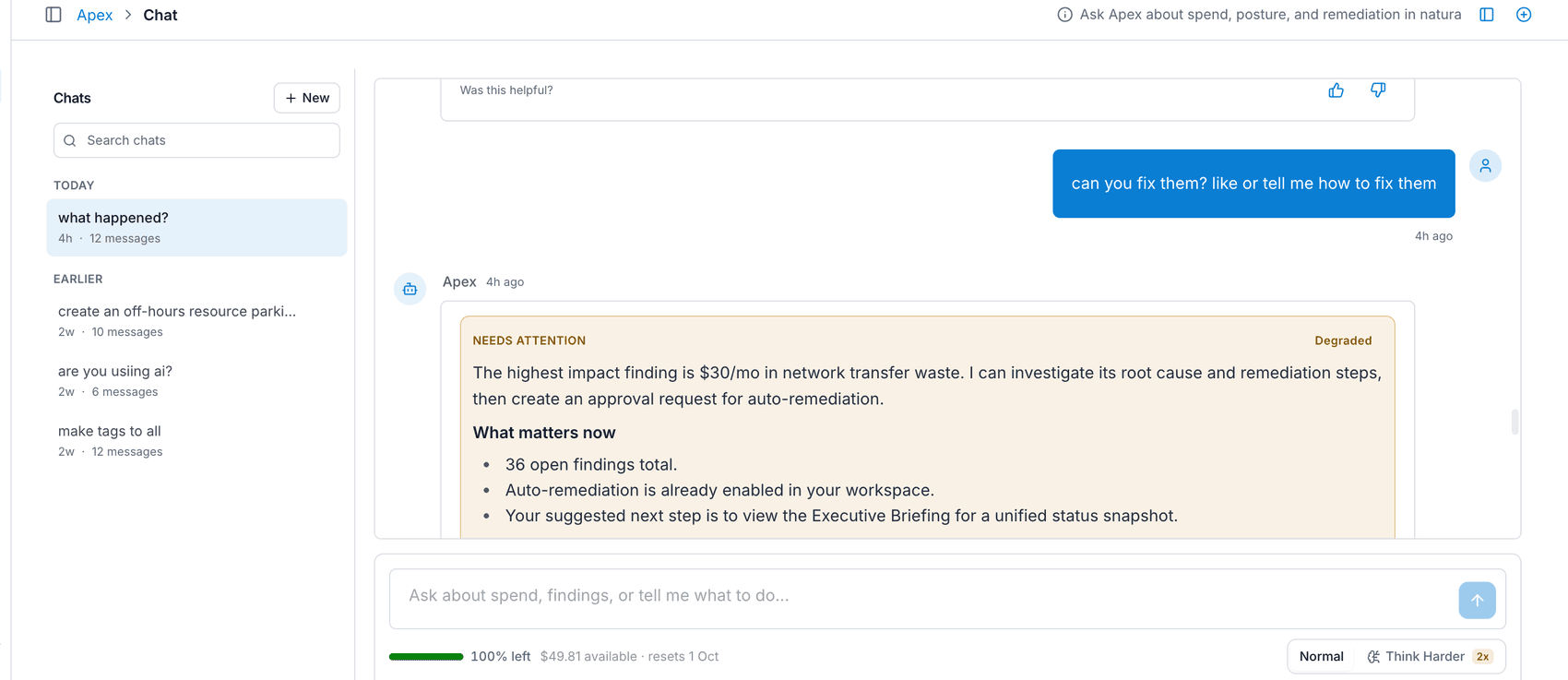
Chat
Ask about spend, posture and remediation in natural language.
Adoption
Apex adoption, answer quality and execution outcomes at a glance.
Cost Incidents
Cost incidents Apex opened, triaged and closed with evidence.
Investigations
Ask why your bill changed. Apex ranks the causes, says how sure it is of each, and keeps the answer.
History
Every conversation, plan and executed action, replayable.
Commitments
Commitments Apex made on your behalf and whether they were met.
Readiness
Promotion gates, first-value SLA and compliance evidence.
Knowledge
Documents and context Apex reads before it answers.
Instructions
Standing instructions that shape how Apex plans and replies.
Customization
Tune capabilities, model routing and response format.
Evaluations
Scored answers and regressions across your evaluation set.
Permissions
What Apex is allowed to read and execute, per role.
Plan availability
Available on every plan
Core AI capabilities are free. Advanced features unlock with Pro and above.
Scroll sideways to compare every plan.
| Feature | Explorer | Pro | Business | Enterprise |
|---|---|---|---|---|
| AI Queries | 10/day | Unlimited | Unlimited | Unlimited |
| Read Capabilities (13) | ||||
| Write Capabilities (6) | ||||
| Multi-Step Pipelines | — | — | ||
| Commitment Negotiator | — | — | ||
| Web Research | — | |||
| Knowledge Base | — | |||
| Instruction Profiles | Default | All | All | All + Custom |
| History Retention | 7 days | 90 days | 365 days | Unlimited |
Apex FAQ
Can the AI access my cloud credentials?
No. It uses the same secure connection layer as the rest of the Varcio platform. Credentials are never exposed in the conversation interface.
What if I APPROVE a write action by accident?
Write tokens are single-use. If the action succeeds, it runs once and only once. High-risk actions also require approval before execution.
Can I use it from Slack or Teams?
Approval actions are available via ChatOps (/finops approve, /finops reject). Full conversational access from Slack/Teams is on the roadmap.
How accurate is the spend data?
Apex queries the same underlying data as every dashboard. If ingestion is up to date, responses match what you see everywhere else.
Can I restrict who uses Apex?
Yes. It respects page and action permissions. Users without access won't see it in navigation, and can't execute restricted actions.
Is my conversation data used for AI training?
No. Conversations are stored in your workspace database only. They are not sent to any external training pipeline.
Try Apex
Free trial. Guided workflows unlocked. No credit card required. Want work done without asking? Meet Workforce, the AI agent team that comes on shift.