
A colleague you ask
Apex answers a question when someone types one, working across your connected clouds in plain English.
- Starts when a person asks
- Reads use live data
- Every write needs explicit approval
Varcio Workforce is a standing team of AI agents across 24 managed-service roles: 23 you can staff, plus an AI Evaluator included free. Seats come on shift on your rota, read your cloud estate, decide whether anything needs doing and hand work up a reporting line, so only the few decisions that genuinely need a person reach you.
Managed service is what most FinOps teams want and few can afford, because it is priced as people. Workforce organises AI agents the way a managed-service provider organises engineers, and prices them per seat-hour.
Apex answers a question when someone types one, working across your connected clouds in plain English.
A Workforce seat comes on shift, looks at the estate, decides whether anything needs doing, and hands the work to the seat above it when it cannot finish alone.
Autopilot is the separate rules-based optimiser that acts on idle and orphaned resources within the mode you choose.
The Service Delivery Lead reports to you. Five practice leads and the Communications Manager report to it, and the practice teams report to their leads. The AI Evaluator sits outside the line and reviews everyone's work. Each seat shows its default grade; you can staff any role at any grade from L1 to L5, and the rate follows the grade you choose.
Select any seat to trace its escalation path and read its charter.
First-line multi-cloud watch: notices what changed, and hands it on.
Sweeps every connected provider more often than any other seat and does one job well — notice that something moved and raise it. Deliberately the cheapest grade, because first-line watch is about coverage and consistency rather than depth.
Seven functions mirror how a managed-services organisation is actually structured: leadership, then the technical practices, then the desk. A team holds one seat per role. Open any role for its charter, cadence, what it watches, what it hands upward and when it escalates.
Owns the engagement: what the team worked on, what it found, and what needs a decision.
4 rolesReads every other seat's output at the end of each cycle, resolves disagreements between them, and publishes a single brief instead of a notification stream from every seat. Owns the escalation list: the small number of things that genuinely need a human this week.
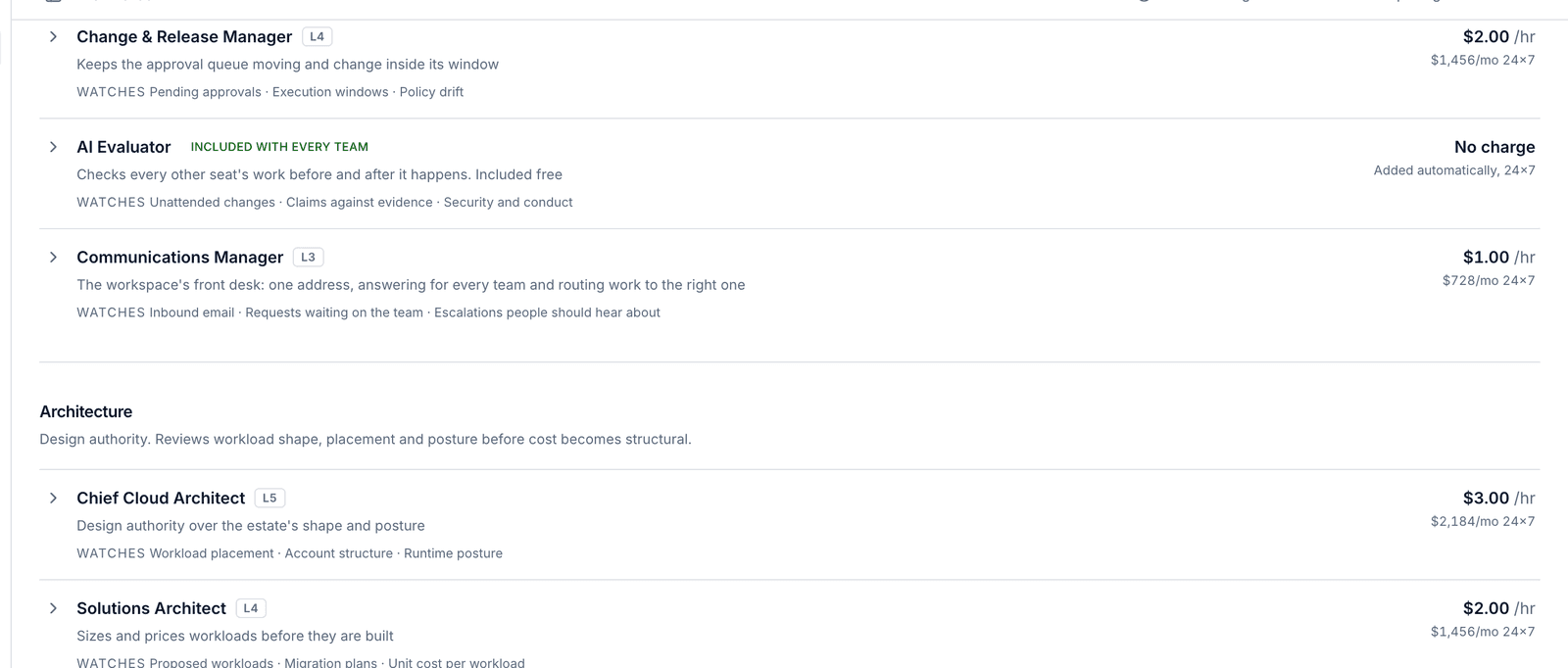
Chases approval requests before they go stale, checks that queued work falls inside an agreed execution window, and flags policies drifting out of date. In a managed service this is the person who stops a good change happening at a bad time.
Independent of the reporting line. Before a change runs unattended it screens it for security risk, grounding and scope, and holds anything short of a clean pass for a person. After each cycle it reviews what every seat concluded, escalated and proposed against the evidence that seat was actually given, and flags invented facts, off-topic work, unsafe recommendations and anything unethical. It can hold work for a person; it can never approve anything.
Works the team's mailbox like a person would. Reads what allowed senders ask, answers from what the platform actually knows — the product, the connected clouds, what every seat is doing and what is running — and hands anything that needs work to the seat that can do it, then writes back with the outcome. Follows your rules on who it may hear from, who it may write to, who is copied and what it may discuss, and every message it sends is cleared by the AI Evaluator first.
Design authority. Reviews workload shape, placement and posture before cost becomes structural.
3 rolesReviews the estate the way a principal architect would at a quarterly design review: is the workload in the right place, is the account structure still right, is posture drifting. Catches the decisions that make cost structural rather than incidental.
Turns a proposed workload into a costed shape — instance families, storage class, container density — and compares it against what the estate already runs. The seat you ask before committing to a design, not after the bill arrives.
Extends today's consumption forward: which budget breaches first at the current rate, which cluster runs out of headroom, which storage curve turns into a problem next quarter. Planning work that only pays off if somebody does it before the quarter starts.
Day-to-day estate management: compute, containers, data stores, pipelines and configuration.
6 rolesMonitors managed database instances the way a DBA would: connection saturation, storage trajectory, slow queries and engine versions drifting out of support. Databases are usually the largest single line on a cloud bill and the least often reviewed.
Reads build and deploy history alongside cost: which pipeline is failing and why, which release changed spend, which infrastructure-as-code change introduces a resource nobody priced. Catches it at review rather than at month end.
Watches the difference between what workloads request and what they consume, which is where container platforms quietly waste money. Attributes cluster cost back to namespace and workload so the number lands on a team rather than on the cluster.
Works the estate for waste: instances running at 4% CPU, volumes attached to nothing, environments awake at 3am on a Sunday. Produces a costed, reversible recommendation for each one rather than a list of resource IDs.
Maintains the record of what is actually running: reconciles scan results, finds resources with no owner and no tags, and proposes the tags that would make the rest of the estate attributable. Unglamorous, and the reason every other seat's numbers can be trusted.
Checks that every cloud account still authenticates, every integration still delivers, and no provider has silently stopped reporting. Every other seat's findings are worthless if a connection broke three days ago and nobody noticed.
Detects, triages and eliminates. First-line monitoring through to root cause and recurrence.
4 rolesOwns an incident from raise to explanation: assembles the timeline, tests root-cause hypotheses against the data, and writes the account of what happened. Staffed at a senior grade because the difference between a plausible cause and the real one is worth paying for.
Looks across incidents rather than at one: which of these has happened four times, which remediation keeps being re-applied, which finding keeps reopening. Incident management restores service; this seat stops the same thing happening again.
Joins signals that normally sit in separate tools — API error rates, database pressure, container health, release timing — and says which of them are the same incident. The seat where overnight cover genuinely earns its rate.
Sweeps every connected provider more often than any other seat and does one job well — notice that something moved and raise it. Deliberately the cheapest grade, because first-line watch is about coverage and consistency rather than depth.
Exposure, posture drift, policy adherence and the evidence an auditor will ask for.
3 rolesReviews what is reachable from the internet, which permissions are broader than the workload needs, and where posture has drifted since the last check. Drafts remediation that runs only inside the change rules you set; anything beyond them goes to a person.
Tracks control coverage against the frameworks in scope, checks that policies are actually enforced rather than merely written, and keeps the evidence trail current. Turns audit preparation from a quarter into a page.
Reviews organisation membership, single sign-on configuration and who holds approval authority. The access review an auditor asks for once a quarter, run continuously instead of assembled in a panic.
Rate and commitment strategy, budgets, allocation and the numbers leadership reports on.
3 rolesWorks the rate side of the bill rather than the usage side — commitment coverage, expiry cliffs, whether a three-year term is defensible given the trajectory. Prepares purchases and takes every one to a person; committing a customer's money stays a human decision.
Builds a picture of how comparable organisations run and pay for infrastructure, and keeps it current. Reports only what connects to something you actually run, with the source attached; a finding that cannot be tied back to your estate is discarded rather than padded into a report. External research stays off until your workspace opts in.
Produces the recurring financial picture — where spend landed, which budgets are tracking to breach, what each team owes on showback, and what a unit of the business costs to serve. The reporting seat every finance team asks for first.
Inbound requests: triage, known-error matching and drafted first responses.
1 roleReads new tickets, matches them against known errors and open findings, and drafts a first response for a human to send. Highest volume, lowest grade — which is exactly how a service desk is staffed.
Every cycle follows the same loop. Seats do the looking and the judging; people keep the decisions.
When its rota starts, a seat checks whether it is due to look, based on its role’s cadence and how the estate has behaved.
It reads your connected cloud accounts through its role’s capability allowlist, which covers what the job needs and nothing more.
It decides whether anything needs doing, and every conclusion carries the reads that support it. Where its allowlist includes change capabilities, it can propose a change within its risk ceiling.
It finishes what it can, refers a finding to the seat that holds the remedy, or hands it up to its manager. Juniors run first, so managers see this cycle’s hand-offs.
The Service Delivery Lead reads every seat’s output, resolves disagreements and publishes one daily brief plus an escalation list.
You clear Needs you and decide proposed changes. After the cycle, the AI Evaluator checks every seat’s work against the evidence it was given.
A NOC Analyst notices a signal and hands it to the seat above it, and each seat adds what it can before passing it on. If an escalation reaches the team's paging floor, critical by default, the team also pages your on-call through your existing PagerDuty and Slack integrations: at most 4 pages an hour, deduplicated, and respecting any quiet hours you set.
A finding with a known remedy goes to the staffed seat that can act on it, wherever it sits on the chart. An unencrypted volume goes to the Cloud Security Engineer, not up a release manager’s chain.
Buy one or two seats and the reporting line resolves to the seats you staffed. The most senior seat reports to you, and writes the brief if no Service Delivery Lead is on the team.
Every escalation eventually reaches the top of your team, so unfinished work always lands in one list instead of scattering across notification streams.
Higher grades think harder; lower grades reason more simply and cost less. How often a seat looks is set by its role: grade baselines run from every 30 minutes at L1 to every 12 hours at L5, and 9 roles set their own, so cadence ranges from 15 minutes to 24 hours.
| Grade | What it does | Best for | Trade-off | Baseline cadence | Per seat-hour | Business hours / month | Around the clock / month |
|---|---|---|---|---|---|---|---|
| L1Associate | Watches, reports, and follows a runbook | High-volume watching where the answer is usually the obvious one. | Reports what it sees. It will miss a subtle cause and escalate more often. | 30 min | $0.15 | $33 | $112 |
| L2Analyst | Connects a few signals and explains them | Routine analysis on estates that behave predictably. | Handles the common cases well; unusual ones still go up the chain. | 2 h | $0.31 | $67 | $224 |
| L3Engineer | Diagnoses across systems and proposes the fix | The default. Most seats do their best work here. | Balanced. Deep enough for real diagnosis without paying for the top tier. | 4 h | $0.62 | $134 | $448 |
| L4Senior | Weighs competing explanations before committing | Production estates where a wrong call is expensive. | Costs more per hour and thinks for longer on each cycle. | 8 h | $1.23 | $267 | $896 |
| L5Principal | Handles the ambiguous and the first-of-its-kind | Incidents with no precedent, and decisions that set direction. | The most expensive tier. Worth it where judgement matters more than volume. | 12 h | $1.85 | $401 | $1,344 |
Current list rates, rounded to the cent. A seat's rate is fixed when it is added, so later price changes never reprice a running seat. Monthly figures use 217 hours for business hours and 728 hours for around the clock, rounded to the dollar, before quiet-cycle discounts and metered model usage.
| Role | Default grade | Looks |
|---|---|---|
| NOC Analyst | L1 | every 15 minutes |
| Service Desk Engineer | L1 | every 30 minutes |
| Incident Manager | L4 | every hour |
| Site Reliability Engineer | L3 | every hour |
| Cloud Connectivity Engineer | L2 | every 4 hours |
| Solutions Architect | L4 | every 12 hours |
| Capacity Planner | L3 | once a day |
| Compliance & GRC Analyst | L3 | once a day |
| Identity & Access Manager | L3 | once a day |
24×7 cover, 728 hours a month.
08:00–18:00, Monday to Friday: 217 hours a month, roughly 30% of continuous cover.
One start–end window within a day, repeated on the days you choose, with a timezone per seat. Overnight windows are not supported.
Every cycle, a seat decides when to look next, inside a band around its role's cadence: a team that raises a blocker once and waits, rather than forty times overnight.
A seat can look up to four times more often than its cadence, or up to three times less often.
The next look comes at a quarter of the cadence, and never sooner than 5 minutes.
The next look comes at half the cadence.
A seat waiting on you or a colleague backs off to 3× its cadence, unless it has just escalated, and is due immediately when the blocker changes.
A seat that plans a follow-up read comes back at half its cadence. It can also ask to look sooner or later, inside the band.
From the third quiet cycle in a row, the interval grows 1.5× with each quiet cycle, up to 3× the cadence.
From 80% of the cap, seats with nothing above low severity slow steadily: normal cadence at 80%, 3× slower at 100%.
Workforce runs in a supervised stage. Out of the box no team can change anything, and widening what a seat can do is never the thing that lets a high-impact change run without a person.
Each role works through an allowlist scoped to its job. For 14 roles it includes change capabilities, and a seat can only propose changes inside its allowlist and risk ceiling.
No team can run a change until you turn change access on for it. Until then, seats can still propose changes for a person to decide.
Even with change access on, the auto-run band starts at none. Changes run unattended only once you raise it to low or medium. There is no high band.
Whatever the seat’s grade or ceiling. Anything above a seat’s ceiling becomes an approval request, which a person can still approve.
A seat whose recent cycles score poorly keeps working, but every change it proposes goes to a person until its scores recover.
Hard rules hold anything that opens a resource to the internet, disables encryption, carries a credential or touches a resource the seat never saw.
Where you have set execution windows, changes wait for the next opening, approved ones included. Only one seat holds change authority over a resource at a time.
Changes lists every change proposed, approved and run. Activity records every cycle, including the ones that found nothing.
Every role carries one of four ceilings, and the roster shows each seat's. A ceiling only matters once you have turned change access on and raised the auto-run band; anything above it becomes an approval request for a person.
A change runs without a person only if it clears every check below, in this order. Fail any one and it waits for a person or for its window. A team runs at most 3 changes per cycle.
| Step | Check | What it takes to pass |
|---|---|---|
| 1 | Allowlist | The change is one the seat’s role is staffed to make. |
| 2 | Change access | You have turned change access on for this team. |
| 3 | Risk ceiling | The change’s risk is within the seat’s ceiling. Otherwise it becomes an approval request. |
| 4 | Quality hold | The seat is not on a quality hold. |
| 5 | Capability approval rule | The capability itself does not always require a person to approve it. |
| 6 | Auto-run band | The change’s risk is within the band you set: none, low or medium. |
| 7 | Prompt-injection check | If this cycle’s evidence contained text addressed to the agent, auto-run is withheld and a person decides. |
| 8 | AI Evaluator screen | Anything short of a clean pass is held for a person. If the evaluator cannot run, medium risk and above waits. |
| 9 | Execution window | Where you have configured windows, the change waits for the next opening. |
| 10 | Resource lease | The seat holds the resource’s lease: 5 minutes by default, 15 at most, one seat at a time. |
A proposed change becomes an ordinary approval request in the platform's approval queue, listed in Changes. You decide it in the dashboard, or by email reply when email approvals are turned on. If the proposing seat's manager seat is staffed, it reviews the proposal first. Senior seats never approve a change into execution.
| Senior review verdict | What happens |
|---|---|
| Endorse | The manager seat’s advice is attached to the request. A person still decides. |
| Reject | The proposal is closed without troubling a person. Nothing runs. |
| Needs a person | The proposal goes to the approval queue as it would have anyway. |
Response is measured against targets, hard calls are deliberated, and every claim of progress rests on evidence.
Escalations are measured against targets you can adjust per team: critical 15 minutes, high 60 minutes, medium 8 hours, low 24 hours. Rota coverage is measured too.
For high-severity findings the chairing seat consults up to 3 colleagues, who answer from what they read this cycle. Dissent is kept on the record.
Your helpful or unhelpful feedback shapes a seat’s next cycle, and seats leave each other notes. Skill cards come from real outcomes, and past cases are recalled with outcomes marked unknown until confirmed.
Written every Monday for the week just ended. Every number is computed from real runs, changes and spend before any prose is written.
Outcomes are held to a share of days, with service credits and quarterly business reviews. Savings count as verified only once evidence confirms them.
External research is off until your workspace opts in. The research seat ties each finding to your estate, and every note cites its sources.
The Communications Manager works the team's mailbox: it answers questions, sends updates and routes requests to the seat that can do the work, inside rules you set.
| Rule | How it works |
|---|---|
| Inbound mail | Must be addressed to the team’s alias. Blocked senders, and senders that fail SPF, DKIM or DMARC checks, are quarantined. |
| Who it answers | Only senders on the allowed list. |
| Who it writes to | Only people on the recipients list, whether addressed or copied. |
| Limits | 10 replies per thread and 100 sends a day. |
| Sending | Send mode starts at approval, so a person clears each message. Every outbound message is screened by the AI Evaluator. |
| Authority | An email never executes anything, except through email approvals. Those are off by default and limited to named decision makers who are active members with approval rights and pass sender authentication. The risk cap defaults to medium and never allows critical, and requests expire after 7 days. |
Workforce shows its work: what each seat is doing now, what it said, what it proposed and what it cost.
Staff a managed-services team of agents.
Staff a team, set rotas, and see the cost before launch.
What each seat is doing, this minute.
Who reports to whom, and every open conversation.
What each seat reported, asked and agreed.
Each seat’s track record.
What the research seat established, and the pages it read.
The one report your team lead writes.
The week’s work, written every Monday from real numbers.
Seat hours by role and AI usage, month to date.
Workforce funds, and how long they last.
Every change proposed, approved and run.
The team’s mailbox and its rules.
Every cycle your seats have run.
Outcomes measured every cycle.
Outcomes held to a share of days, with service credits and business reviews.
What the team is waiting on you for.
Hand-offs waiting to be picked up, worst first.
The reporting chain, and when it reaches you.
Workforce is included on the Pro, Business and Enterprise plans, and the 14-day trial runs on Business. Seats bill per seat-hour while on rota, from a funded Workforce balance.
| Seat | Rota | Hours | Rate | ≈ / month |
|---|---|---|---|---|
| Platform EngineerL3 Engineer | Business hours | 217 | $0.62 | $134 |
| NOC AnalystL1 Associate | Around the clock | 728 | $0.15 | $112 |
| Cloud EconomistL4 Senior | Business hours | 217 | $1.23 | $267 |
Current list rates, before quiet-cycle discounts and metered model usage. Business hours are 10 h × 5 days × 52/12 weeks ≈ 217 h; around the clock is 24 h × 7 days × 52/12 weeks ≈ 728 h. The AI Evaluator adds nothing to these figures.
Build trust the way you would with a new managed-service provider: small scope first, evidence before authority.
Start on your most acute coverage gap, not a full team.
Add Workforce funds, review the projected monthly cost and set a cap above it.
Follow what each seat does through its first few shifts.
It is the single list of what the team is waiting on you for.
Read the supporting evidence on each change before you decide it.
Once the team is reliable, give it outcomes to work toward and re-measure.
Compare seat-hour spend against delivered value in Spend.
Varcio Workforce is a standing team of AI agent seats, each staffed into a managed-service role such as NOC Analyst, Site Reliability Engineer or Cloud Economist. Seats come on shift on a rota you set, read your connected cloud estate through a capability allowlist scoped to their role, decide whether anything needs doing, and hand work up a reporting line that ends at a Service Delivery Lead, who brings the small number of real decisions to people.
It is organised the way a managed service provider is: named roles, a reporting line, escalation, a daily brief and a change queue. The difference is the commercial model and the authority model. You staff only the seats you need, pay per seat-hour while they are on rota rather than per person, and no seat can ever approve a change into execution. If you want people running your estate, Varcio Cloud Services offers a human managed service that works alongside Workforce.
Only inside limits you set, and never for high-impact work. Change access is off for every team until you turn it on, and even then every change waits for a person until you raise the team's auto-run band to low or medium; there is no high band. A seat can only propose changes inside its role's allowlist and risk ceiling, anything above its ceiling becomes an approval request for a person, and high- and critical-risk changes always need a person. Before a change runs unattended it must also clear the seat's quality hold, the capability's own approval rule, a prompt-injection check, the AI Evaluator's screen, any execution window you have configured and a resource lease, so only one seat holds change authority over a resource at a time. A team runs at most 3 changes per cycle, and every one is listed in Changes.
No. The catalogue has 24 roles: 23 you can staff, plus the AI Evaluator, which is added free to every team with a paid seat and cannot be removed. Most teams start with one or two seats on their most acute coverage gap. You can staff any role at any grade from L1 to L5, and the rate follows the grade you choose. A team holds one seat per role, a workspace can run up to 10 teams, and the reporting line resolves to the seats you staffed: the most senior seat reports to you, and writes the daily brief if there is no Service Delivery Lead.
Workforce is included on the Pro, Business and Enterprise plans, but not on Explorer. The 14-day free trial runs on Business. Seats draw on a funded Workforce balance, separate from Apex AI credits, so a team cannot launch until funds are added.
Each cycle bills the on-rota minutes since the seat's previous cycle, up to four cadences, at the rate fixed on the seat when it was added. Current list rates run from $0.15 per seat-hour at L1 to $1.85 at L5, and a later price change never reprices a running seat. Off-rota time bills nothing, quiet cycles bill at 25%, failed cycles bill $0, and AI model usage is metered at 1.5 times provider cost. Workforce draws on its own funded balance: a team pauses when funds run out and restarts automatically when they are added. The AI Evaluator is included free.
Every team needs a monthly cap above $0, and launch is blocked if the projected rota cost exceeds it. Before each run, spend already billed this month is checked against the cap. From 80% of the cap, seats with nothing above low severity slow down steadily, from their normal cadence at 80% to three times slower at 100%. At the cap the team pauses and restarts on the 1st of the next month. Pausing at the cap is on by default; if you turn it off, seats simply stop running until the month rolls over.
Apex answers a question when someone types one: it is a colleague you ask. A Workforce seat comes on shift, looks at the estate, decides whether anything needs doing, and hands the work to the seat above it when it cannot finish alone: it is a team that turns up. Autopilot is the separate rules-based optimiser with three modes (observe, suggest and autopilot). It deletes only orphaned disks, snapshots and load balancers when explicitly allowed, and never in production environments.
People. A proposed change becomes an ordinary approval request in the platform's approval queue, listed in Changes, and is decided in the dashboard, or by email reply when email approvals are turned on. If a junior seat's manager seat is staffed, that seat reviews the proposal first: it can endorse it (its advice is attached and a person still decides), reject it (it is closed without troubling a person) or say it needs a person. No seat of any grade can approve a change into execution, and each proposal carries the reads that support it.
Yes. Each team has a paging policy. Escalations at or above its severity floor, critical by default, page through the PagerDuty and Slack integrations your workspace already has: at most 4 pages an hour, deduplicated, and respecting any quiet hours you set. Nothing pages until an alert channel is connected.
Workforce seats read AWS, Microsoft Azure, Google Cloud and Oracle Cloud Infrastructure (OCI) through the cloud accounts you connect to Varcio, and Kubernetes cost through the Kubernetes integration. A seat can only use what its role's allowlist and your connections allow.
The AI Evaluator is an oversight seat outside the reporting line. It is added free to every team with a paid seat, cannot be removed, and its running costs are never billed. Before a change runs unattended it screens it: hard rules hold anything that opens a resource to the internet, disables encryption, carries a credential or touches a resource the seat never saw, and anything short of a clean pass is held for a person. If the evaluator cannot run, unattended changes at medium risk and above wait for a person. After each cycle it reviews the team's runs against the evidence each seat was given; flags lower a seat's quality score, and serious ones are escalated to you. It can hold work, but never approve it.
Start with one or two seats on your biggest coverage gap, fund the team, set a monthly cap, and follow the first shifts in Live.